

If you are still using your ISP providers DNS this is something you really must change moving into 2026. ISPs have pretty awful DNS servers, they are often slow meaning pretty much everything you do on the tinternet is slower than it could be, and changing to a better DNS provider can work wonders as a lot of malicious websites are simply blocked at source. I also use a pi-hole setup to get rid of ads and malicious websites and between the 2 my browsing and general tinternet experience is way better than it used to be, and better than that it is pretty easy to do!
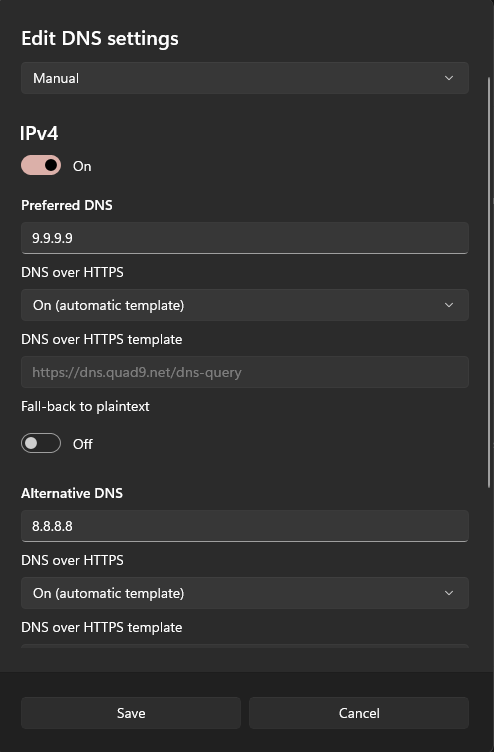
Above are my current personal DNS settings on this Win 11 box – pi-hole is NOT my current provider as this is my work machine so I am willing to take the bad things because often clients will explain about an issue and I need to (as much as I can) replicate the issue. The DNS is set to Quad9 as the main DNS provider with Google as a fallback. Both use encrypted DNS for added security (Micro$oft call it DNS over HTTPS in the dialogue)
With this setup I DO get the odd ad or malicious site, but a lot of stuff is filtered out. Websites load quicker, my system is more secure and my privacy is increased. These changes, along with no longer using Google have reduced things like the ads on Facebook (when I visit it, which is rare these days) being all about what you just searched for. I have also found my browsing experience and general tinternet use to be faster as well! I urge you to do this if you can as it does make a huge difference, you can also do it on your phone as well, if running a pi-hole setup is not possible to you! A pi-hole article is coming soon as well just to keep you up to date!
So how do you update your DNS provider? Well on Windows you can find it under settings>Network and Internet> and then under your connection type either ethernet or wi-fi. It does alter slightly but I’m sure you can find it without too many issues. Below is a list of decent DNS providers and their IP addresses.
Quad9 – ip:9.9.9.9 and 149.112.112.112 supports DNS over HTTPS or encrypted DNS
Google – ip:8.8.8.8 and 8.8.4.4 supports DNS over HTTPS
Cloudflare – ip:1.1.1.1 and 1.0.0.1 supports encryption
There are others available, of course, but those 3 have proven to be reliable and good over the last say 5 years for me. Changing your DNS provider is a simple change for many but can reap dividends in general tinternet browsing.
I also have a different DNS provider as my fallback, this has proven to help tinternet issues as if one is unavailable for example, then the other is pretty likely to still be working unless the issue is massive! I have settled for Quad9 as default and Google as backup because of this, though I cannot remember the last time Quad9 was actually down completely. I hope this article can help you choose if you would like to change DNS providers – though I pretty much recommend this as an easy option to help your tinternet experience!
Remember you can also change these settings on your phone, links are below
https://www.bitdefender.com/consumer/support/answer/82149/
https://www.bitdefender.co.uk/consumer/support/answer/115360